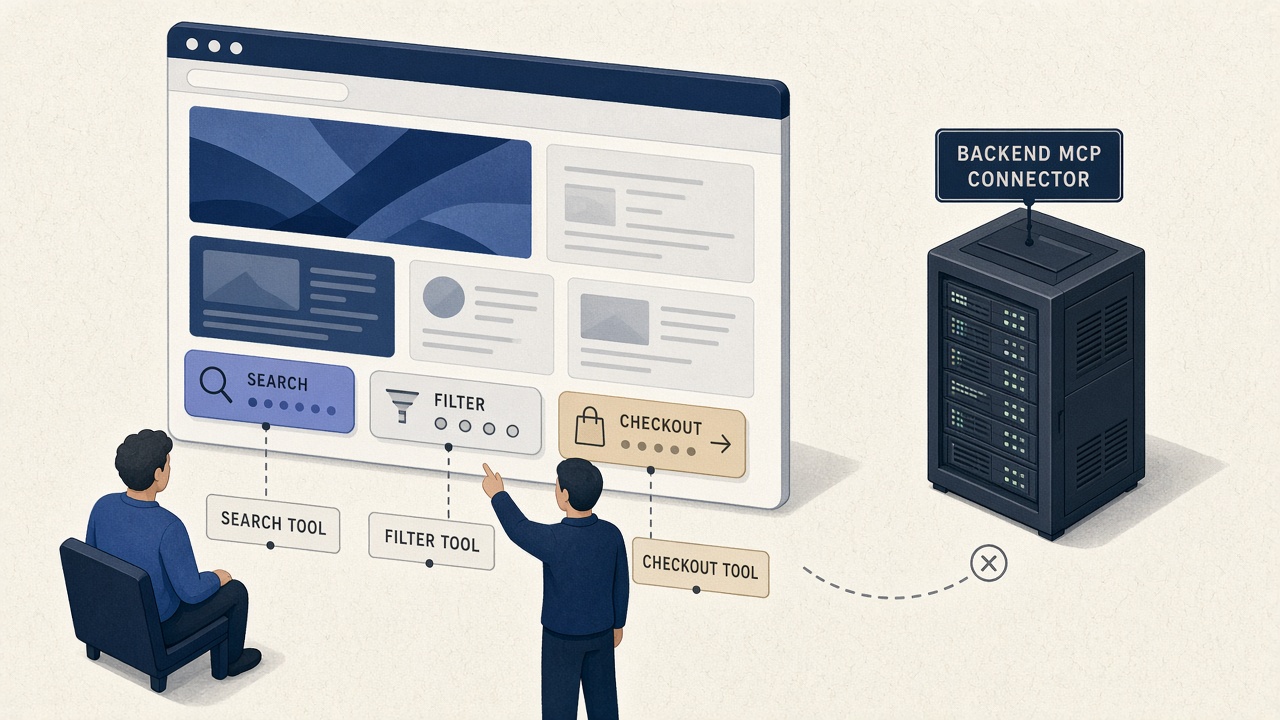
ChatGPT’s desktop browser now speaks site tools — OpenAI’s name for the proposed WebMCP standard. An agent and a human can sit on the same live page, same signed-in session, and call named actions the site actually published.
That is a real product moment. It is also the week a lot of teams will make the wrong architectural call.
Your website is not an MCP server. If you treat ChatGPT site tools like another remote connector — paste a URL, ship a tools/list, hope the agent never looks at the DOM — you will build the wrong surface, on the wrong trust boundary, for the wrong client.
We already published the explainer: what WebMCP is, and why declared tools beat DOM guessing. This is the operator point of view after site tools landed in a consumer agent.
The category error this week
Classic MCP is a client-to-server protocol. You connect Cursor, Claude, or ChatGPT to GitHub, Postgres, a CRM. The tools live with the agent. The website is optional.
WebMCP is the opposite shape. The page is the tool server. Discovery is visit-the-origin. Execution is visible. Permissions are origin-scoped. The human is supposed to still be looking at checkout.
OpenAI is explicit: site tools are not the MCP connectors ChatGPT has had since 2025. ChatGPT Work and Codex can use them in the built-in desktop browser, on GPT-5.6 Sol or Terra. Luna has WebMCP off. Enterprise and Edu workspaces do not get site tools in this rollout. Chrome still needs a flag or origin trial. See OpenAI’s site tools docs.
If your board slide says “we support MCP” because you annotated a form, you are mixing two markets.
What ChatGPT actually implemented (read this before you ship)
The subset matters more than the press release.
| If you built… | ChatGPT site tools today |
|---|---|
Imperative document.modelContext.registerTool() | This is the path that shows up as site tools. |
| Declarative HTML form annotations | Not supported in ChatGPT’s browser. Agents fall back to ordinary form filling. |
| Tools registered inside iframes | Not discovered — same-origin or not. |
| A remote MCP connector that wraps your storefront | A different product. Useful for backends. Invisible to site tools until someone opens the page. |
So the “we WebMCP’d the site” demo that only added toolname attributes on a checkout form will look empty in ChatGPT. That is not a standards failure. That is a client subset. Ship imperative tools on the top-level document, or do not claim ChatGPT coverage.
Keep the two catalogs in different drawers
Influzer indexes both on purpose, and we refuse to collapse them:
- MCP servers — durable integrations. Handshake, auth gate, allowlist. ~12,000 listings, a thin slice with indexed tools.
- WebMCP websites — page-scoped tools in the browser. ~864 sites and ~5,660 tools in our snapshot. Verified means we observed an implementation, not that it is safe to transact.
Use MCP when the agent needs systems that are not the website: repos, warehouses, ticketing APIs. Use WebMCP when the agent is already on your origin and should drive this UI with the user’s session. WebMCP is not an MCP server is the whole product distinction.
The stack that actually ships products is both. That is why Influzer’s own page registers recommend_agent_stack — shortlist WebMCP sites and classic MCP servers for one build goal. Agents should not have to pick a religion.
The POV: declare verbs, do not wrap the storefront
Three anti-patterns we will keep calling out:
- Headless checkout as an MCP server. You moved payment off the page the human can see. WebMCP exists so confirmation stays on your UI. If money moves, it is a transact tool on the page — not a silent remote call.
- Seventy micro-tools named after CSS components. Agents need intents: search, filter, book, pay, cancel. Tool sprawl is the same disease as MCP demoware. Read-only answer tools first. Act second. Transact last, with a human gate.
- Assuming a directory visit is enough. Chrome and OpenAI both treat discovery as page-scoped. A listing on Influzer is a lead. The agent still has to open the site. That is why we scan and score Agent Readiness (R0–R5) instead of minting a SAFE badge.
Same discipline as honest MCP labels and eyes before hands. Facts on the listing. Writes behind a policy.
What to ship in the next ten days
- Pick one journey where browser agents already fail (support ticket, booking wizard, docs search).
- Register 2–4 imperative tools on the top-level document with schemas a stranger could fill. Names like
search_docs, nothandleClick_div12. - Do not rely on declarative forms for ChatGPT until that client says otherwise. Keep the HTML annotations if Chrome is a target; do not make them your only surface.
- Classify answer / act / transact. If a tool can move money or delete an account, require visible confirmation.
- Prove it in ChatGPT desktop (Sol/Terra) and in Chrome with the inspector. Then submit the site for an Influzer scan.
You do not need to WebMCP the marketing homepage. You need declared tools on the three flows that currently die in a date picker.
Why a WebMCP directory still matters
Page-scoped discovery is a feature for safety. It is a problem for builders. Agents cannot plan a stack if they only learn tools after they land.
A directory does not replace the visit. It answers the question which origins are even in the game — how many tools, what kinds, whether anyone has scanned them. Then open_webmcp_site puts the agent on the live page, where site tools actually run.
That is the same philosophy as MCP Discovery: search by capability, install nothing by default. Browse the WebMCP directory, try Influzer’s own tools on /webmcp/demo, or connect classic servers from Discovery setup.
Quick answers
Is this a ranking signal in ChatGPT Search?
OpenAI does not document site tools as a search, citation, or recommendation ranking factor. Treat WebMCP as actuation quality, not SEO. GEO is a different playbook — see what GEO actually is.
Should we wait for Enterprise?
If your buyers are Enterprise/Edu, site tools are not their client yet. Ship the tools anyway. Chrome and other agents will catch up. Do not block the product on one workspace SKU.
Can we skip WebMCP and let the agent click?
You can. You will own every date-picker failure. Declared tools are how you make the boundary of automation legible — including what the site cannot do.
Do we still need classic MCP?
Yes, for everything that is not the webpage. Repos, data, mail, internal APIs. WebMCP does not replace .cursor/mcp.json. It stops you from stuffing the storefront into it.
Related reading
- What is WebMCP?
- About the Influzer WebMCP Directory
- What is the Model Context Protocol?
- One MCP connector, three surfaces
- Not “safe” — just honest
- ChatGPT — Site tools (WebMCP)
- Chrome Developers — WebMCP
Final thought
Site tools will tempt every team to say they “added MCP to the website.” They did not. They published page-scoped verbs for a human-in-the-loop browser. That is better. It is also narrower than a connector.
Declare the journey. Keep money on the page. Put backends on real MCP servers.
Start with the WebMCP directory. Read the explainer if you need the standard. Then register two imperative tools on the flow that already embarrasses your computer-use demo.
One clear email each Thursday
Actionable frameworks on AI execution, agents, and MCP. Join 4,200+ builders.
Leave a comment
Be the first to share your thoughts.