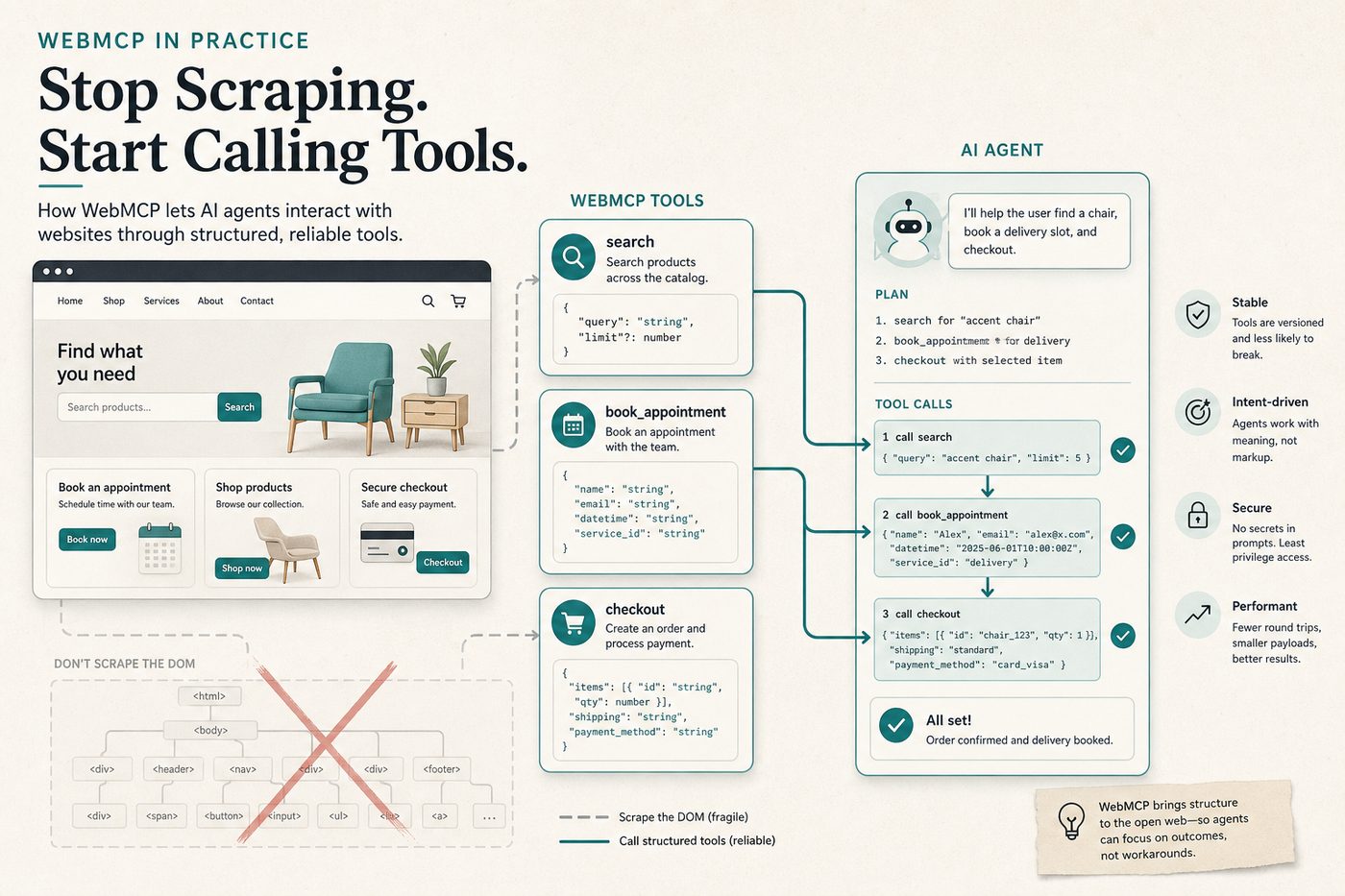
WebMCP (Web Model Context Protocol) is a proposed web standard that lets a website expose structured tools to AI agents — with names, descriptions, and JSON schemas — so the agent knows exactly what the page can do.
Instead of scraping buttons and guessing which field is “first name,” the agent can call something like book_appointment or filter_results. The site declares the contract. The browser mediates the call. The UI still runs in front of the user.
That is the shift: from inferred actuation to declared capability. Agents navigate better because ambiguity drops. Humans stay in the loop because actions happen on the real page.
Chrome documents WebMCP as an early preview / origin-trial effort — see the official guide: developer.chrome.com/docs/ai/webmcp.
The problem: agents are bad at guessing websites
Most browsing agents today still operate like a careful human with a blurry map:
- Parse a huge DOM
- Guess which control matches the intent
- Click, wait, re-read, recover from a modal
- Hope the date picker, SPA route, or shadow DOM did not break the plan
That works for demos. It fails on real product surfaces — multi-step checkout, nested support forms, travel itineraries with constraints. Every step is an interpretation. Every interpretation is a place to hallucinate a click.
WebMCP’s pitch is simple: stop making the agent reverse-engineer your UX. Publish the verbs your site already supports.
What WebMCP actually is
WebMCP gives pages a standard way to register tools that agents can discover and call while the user is on that origin. Per Chrome’s docs, the model centers on three ideas:
- Discovery — pages register tools such as
checkout,search, orfilter_results - JSON Schemas — explicit inputs and outputs, so agents stop inventing field meanings
- State — shared context for what is available on the current page right now
Tools execute on your webpage, visibly. Brand, layout, and confirmation UX stay yours. The agent is not inventing a parallel headless checkout; it is driving the interface through a declared API surface.
One-line definition: WebMCP turns a website into a small, page-scoped tool server that AI agents can call with structured arguments.
Why clearly exposed tools change navigation quality
When tools are explicit, three things get easier for both the agent and the product team:
1. The agent knows what the site can do
A tool list is a capability menu. If the page exposes search_flights, select_fare, and request_user_confirmation, the agent can plan against those verbs. It does not need to invent a “click the blue Continue near the price” strategy.
2. The agent knows what the site cannot do (yet)
This is underrated. If there is no cancel_subscription tool on the page, the agent should not thrash through account menus hoping to find one. Missing tools are a clear signal: hand control back to the user, or navigate to a page that declares the capability.
In other words, WebMCP makes the boundary of automation legible. That is how you reduce unsafe improvisation.
3. One tool call can replace a brittle click chain
Chrome’s framing contrasts DOM scraping with direct tool calls. A single submit_application tool can map conversationally collected data onto the correct fields — full name vs first/last, required vs optional — without the agent role-playing a form filler across twenty DOM mutations.
Reliability goes up because the site owns the mapping logic. The agent owns intent.
Two ways to expose tools
Chrome describes two complementary APIs:
| API | How it works | Best for |
|---|---|---|
| Declarative | Annotate standard HTML forms so they become tools | Support tickets, simple submits, classic form flows |
| Imperative | Register tools in JavaScript for custom logic and state | Filters, booking wizards, diagnostics, SPA actions |
Start declarative where HTML already encodes the workflow. Move imperative when the interaction is stateful or hidden behind nested UI that humans understand and agents do not (complex date pickers are the classic example).
WebMCP vs MCP (the server protocol)
Naming collision is real. Keep the layers straight:
- MCP (Model Context Protocol) — usually means the open protocol for connecting AI clients to external servers (GitHub, Postgres, browsers, SaaS). Hosted or local processes expose tools over stdio/HTTP.
- WebMCP — a browser / web-platform proposal so the website itself exposes in-page tools to agents, with human-visible execution and origin-scoped permissions.
They are complementary, not competitors:
- Use MCP servers when the agent needs systems behind the browser — repos, databases, CRM APIs. Browse options in the Influzer MCP directory.
- Use WebMCP when the agent is already on your site and should operate your UI safely and precisely.
Think of WebMCP pages as tiny, page-scoped tool surfaces. Think of MCP servers as durable integrations that travel with the agent across apps.
Concrete use cases that get better immediately
From Chrome’s guidance and the shape of real agent failures:
- Customer support —
open_ticket/submit_applicationtools map chat-collected details into the right fields without missing required diagnostics - Travel booking — search, filter, and book multi-city trips with structured passenger and date inputs instead of brittle calendar clicks
- Ecommerce — configure options and advance checkout with declared steps; request explicit user confirmation for payment
- Developer settings —
run_diagnosticsbehind nested menus becomes a named tool instead of a treasure hunt
Sensitive actions should still demand human confirmation. WebMCP does not remove judgment; it removes guesswork.
Security and trust boundaries (do not skip this)
Chrome gates WebMCP carefully:
- Origin isolation — tools require a stable origin; APIs disable if the document is not origin-isolated
- Permissions Policy
tools— defaults toself; cross-origin iframes need explicitallow="tools" - Human-centered by design — primarily local browser workflows with a person present, not a license to silently automate the open web headless
For product teams, the rule of thumb matches good MCP hygiene: least privilege, visible execution, confirm irreversible actions. If you already audit MCP tool sprawl with our seven-question checklist, apply the same discipline to which WebMCP tools you publish on each page.
How to try WebMCP today
- Read the Chrome docs: WebMCP overview
- Enable local testing via
chrome://flags/#enable-webmcp-testing(and relaunch) - Join the WebMCP origin trial / early preview program as Chrome documents for your channel
- Use the Model Context Tool Inspector extension to list registered tools, call them manually, and validate schemas
- Study the public demos (imperative travel/booking demos and declarative form demos linked from Chrome’s page)
Expect change. This is an active standards discussion (W3C Web Machine Learning community incubation) with a live Chrome implementation path — not a frozen API.
What product and platform teams should do now
- Inventory the verbs on your top task journeys (search, filter, book, pay, cancel, contact)
- Pick one high-friction flow where agents already fail (support form or booking wizard)
- Expose 2–3 tools with ruthless schema clarity — field names that match how users speak
- Add confirmation for money, deletion, or account changes
- Measure task success vs your current browser-agent baseline (steps, retries, human takeovers)
You do not need to “WebMCP the whole site.” You need declared tools on the journeys where DOM guessing is most expensive.
FAQ: WebMCP for agents and websites
Does WebMCP replace Playwright / computer-use agents?
No. It reduces how often you need raw UI actuation on sites that adopt it. Agents will still fall back to vision/DOM strategies on pages without tools — which is exactly why publishing tools becomes a competitive advantage.
Is WebMCP the same as Anthropic’s MCP?
No. MCP connects clients to external tool servers. WebMCP is a web-platform approach for in-page tools. Many stacks will use both.
Can agents discover my tools without visiting the page?
Chrome notes a real limitation: clients generally need to visit the site to know which tools exist. WebMCP is page-scoped discovery, not a global app store.
Should every button become a tool?
No. Expose stable user intents — not every micro-interaction. Too many tools recreates the sprawl problem MCP teams already know.
Further reading
- Chrome Developers — WebMCP
- What is the Model Context Protocol (MCP)?
- How MCP servers are taking over integrations
- GEO: getting cited by AI answers
- Browse MCP servers on Influzer.ai
Bottom line: WebMCP helps agents navigate the web better because websites finally say what they can and cannot do — in tool form, with schemas, on the live page. Less guessing. Clearer boundaries. Faster task completion. That is how the agentic web becomes operable instead of merely scrapeable.
One clear email each Thursday
Actionable frameworks on AI execution, agents, and MCP. Join 4,200+ builders.
Leave a comment
Be the first to share your thoughts.