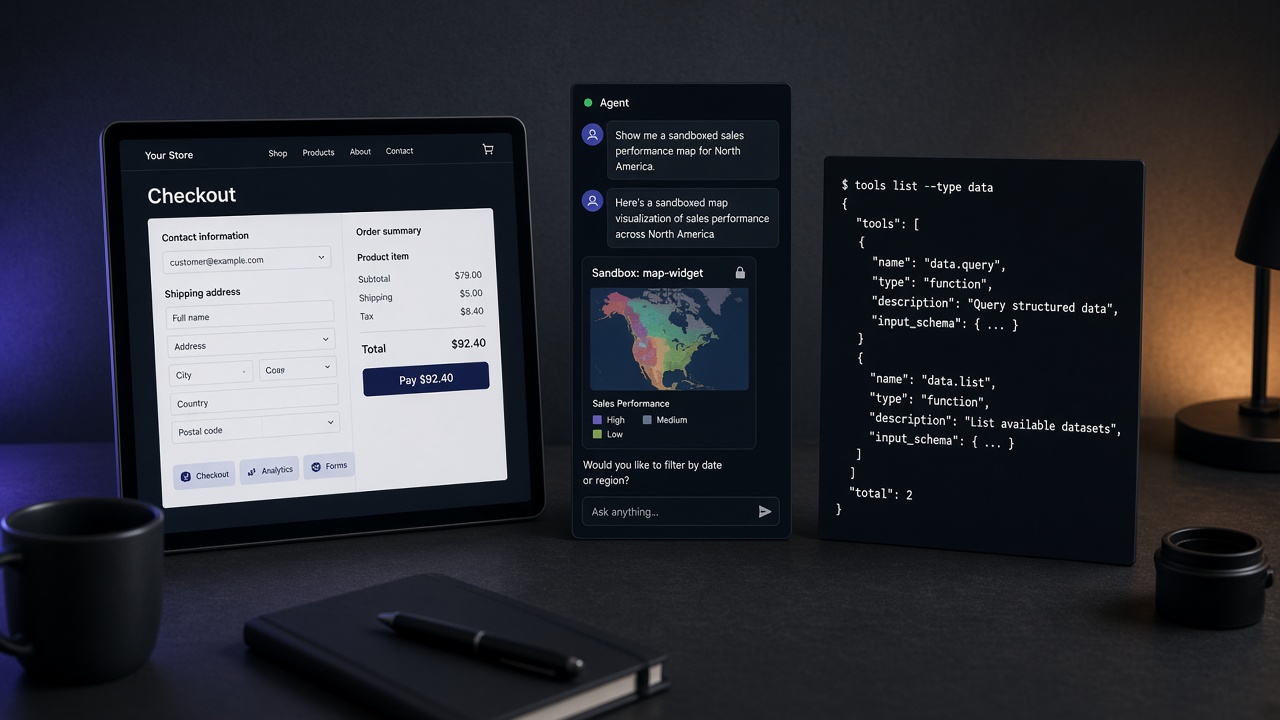
Toronto is three days away. Someone in the hallway will demo a chart inside Claude, a checkout inside ChatGPT’s browser, and a GitHub connector — and call all three “MCP.”
They are not the same product. They do not share a trust boundary. If you pack one allowlist row for all of them, you will ship the wrong UI into the wrong client.
MCP Apps are not WebMCP. WebMCP is not a connector. Classic MCP still has no UI. Pick the surface before you pick the SDK.
The split the spec already made
Three layers are live at once in October 2026:
| Surface | Where the UI lives | What the human sees | What to allowlist |
|---|---|---|---|
| Classic MCP | Nowhere. tools/list and JSON. | A tool call in the client. | The remote URL. Owner. Auth. Writes vs reads. |
| WebMCP / site tools | Your origin. document.modelContext. | The live page they already opened. | The hostname. Answer / act / transact. Visible confirmation for money. |
| MCP Apps (SEP-1865) | A sandboxed iframe inside the agent. | A widget the server shipped over ui://. | The same MCP URL plus HTML the host will render. |
Classic MCP is the catalog we already index: about 12,850 servers on Influzer, about 383 with indexed tools. WebMCP is the other drawer: about 1,330 sites and 7,750 page tools. MCP Apps sit on top of a real MCP server — they do not get a third directory just because someone added a chart.
The official split is not ours. SEP-1865 is an MCP extension: UI resources, _meta.ui.resourceUri, iframe sandbox, JSON-RPC over postMessage. Chrome’s WebMCP vs MCP note is equally blunt: the agent is a guest on your page, not the other way around. We already said the storefront sentence in your website is not an MCP server. This is the complementary mistake: stuffing the storefront into Claude’s iframe and calling it “the website.”
What an MCP App actually is
An MCP App is a normal MCP server that also serves HTML. The tool declares a UI resource. The host fetches it, puts it in a sandbox, and brokers messages. Claude documents this as MCP Apps in the client. ChatGPT runs the same open keys and still offers Apps SDK extras (window.openai, checkout helpers) on top.
That is useful. Maps, pickers, confirmation cards, a scatter plot you can actually click — those are bad as JSON blobs and worse as DOM-guessing on a public page you do not control.
It is also a new attack surface. The HTML is not your origin. It is content the connector handed the host. Treat it like untrusted UI from a vendor, because that is what it is. If the widget can call tools, it can write. If it can ui/open-link, it can bounce a user. If you only reviewed tools/list, you did not review the App.
Three demos that will lie to you this weekend
- “We added MCP to the website.” They registered
document.modelContextor they wrapped checkout as a remote server. One is WebMCP. One is a connector. Neither is an MCP App. Ask: does the human still see your URL bar? - “Our App runs everywhere — we used the Apps SDK.”
window.openai-only widgets are ChatGPT-shaped. Claude is picky about theui/initializehandshake; hosts that skip it still show a fallback line. Ask: show the same_meta.ui.resourceUriin Claude Desktop and ChatGPT, not a recording from one vendor. - “It’s just a prettier tool result.” Then why does the iframe talk back? Bidirectional UI is a second client. Put it on the allowlist as a write surface until you prove it is display-only.
Same honesty rule as not “safe,” just honest. A live widget is not a SAFE badge. It is a fact: this server ships HTML into the agent.
How to choose (print this next to the allowlist)
- Need GitHub, the warehouse, the ticketing API? Classic MCP. HTTPS URL. Auth. No UI required. Test the same connector on three clients — that is still one connector, three surfaces.
- Need the agent on this booking flow, signed-in session, money on the page? WebMCP. Imperative tools on the top-level document. ChatGPT site tools still skip declarative HTML forms and iframe-registered tools. Keep confirmation visible. Browse the WebMCP directory.
- Need the human to pick a cluster, confirm a payload, or read a chart without leaving Claude or ChatGPT? MCP Apps. Ship
ui://HTML. Negotiate the UI extension. Do not hide checkout there if the policy says money stays on your origin.
You can use more than one. You should not collapse them in the architecture slide.
Operator checklist before you ship a widget
- Name the surface in the listing. “Remote MCP + MCP App UI” is a different sentence from “WebMCP on checkout.” If the README says both, it is confused, not complete.
- Review the HTML like a client. CSP, no surprise network, handshake that actually sends
ui/notifications/initialized. Claude will keep the iframe hidden if you skip it. That is a product bug, not a host bug. - Do not gate the whole server on UI capabilities. Hosts that never advertise
io.modelcontextprotocol/uishould still get JSON tools. Withholding_meta.uibecause Claude’s initialize payload is thin is how you get “works in ChatGPT, blank in Claude.” - Keep transact off the iframe unless that is the product. Eyes before hands still applies. A chart is eyes. A “Pay” button in a sandbox is hands with a prettier costume.
- Allowlist the URL once, annotate the UI. Same hostname as the connector. Extra column: ships App HTML? yes/no. If yes, who reviewed the resource?
What Influzer will and will not do
We will not merge MCP Apps into the WebMCP catalog. Page tools are visit-scoped. App widgets ride a connector. Mixing them is how directories become fiction.
We will keep indexing MCP servers as servers — tools, handshake, auth gate, thin vs ready. If a listing’s description mentions MCP Apps, that is a label on a connector, not a new class of website. Search those from Discovery the same way you search anything else: by capability, install default-deny.
If you are going to Toronto, this is the booth question that survives the sticker: “Is the human looking at my origin, at your iframe, or at JSON?” Walk if they cannot answer. Pair it with the packing list in pack an allowlist.
Quick answers
Is an MCP App a ChatGPT App?
Build to SEP-1865 first (_meta.ui.resourceUri, ui://, ui/* JSON-RPC). Add window.openai only for ChatGPT-specific extras. The Apps SDK did not replace MCP. It layered on it.
Can WebMCP replace MCP Apps?
No. WebMCP needs the tab. MCP Apps need the host. Different lifecycle, different discovery, different failure mode.
Should every MCP server ship a widget?
No. Most of the catalog is already demoware without HTML. A widget on a thin listing is a prettier rumor. Tools first. UI only when JSON is the bottleneck.
Where do I look this up on Influzer?
MCP servers for connectors. WebMCP websites for page tools. This Insight for the third surface, until hosts make App UI as boring as tools/list.
Related reading
- Your website is not an MCP server
- What is WebMCP?
- What is the Model Context Protocol?
- One MCP connector, three surfaces
- Pack an allowlist for MCP Dev Summit
- SEP-1865 — MCP Apps
- Claude — Get started with MCP Apps
- OpenAI — MCP Apps in ChatGPT
Final thought
The protocol war is over. The UI war is a category error waiting for a conference badge.
Tools in the client. Verbs on the page. Widgets only when JSON is not enough — and never as a place to hide money.
Start on the directory. Keep the other drawer at WebMCP. If a booth collapses the three, you already have the sentence: an MCP App is not a website.
One clear email each Thursday
Actionable frameworks on AI execution, agents, and MCP. Join 4,200+ builders.
Leave a comment
Be the first to share your thoughts.