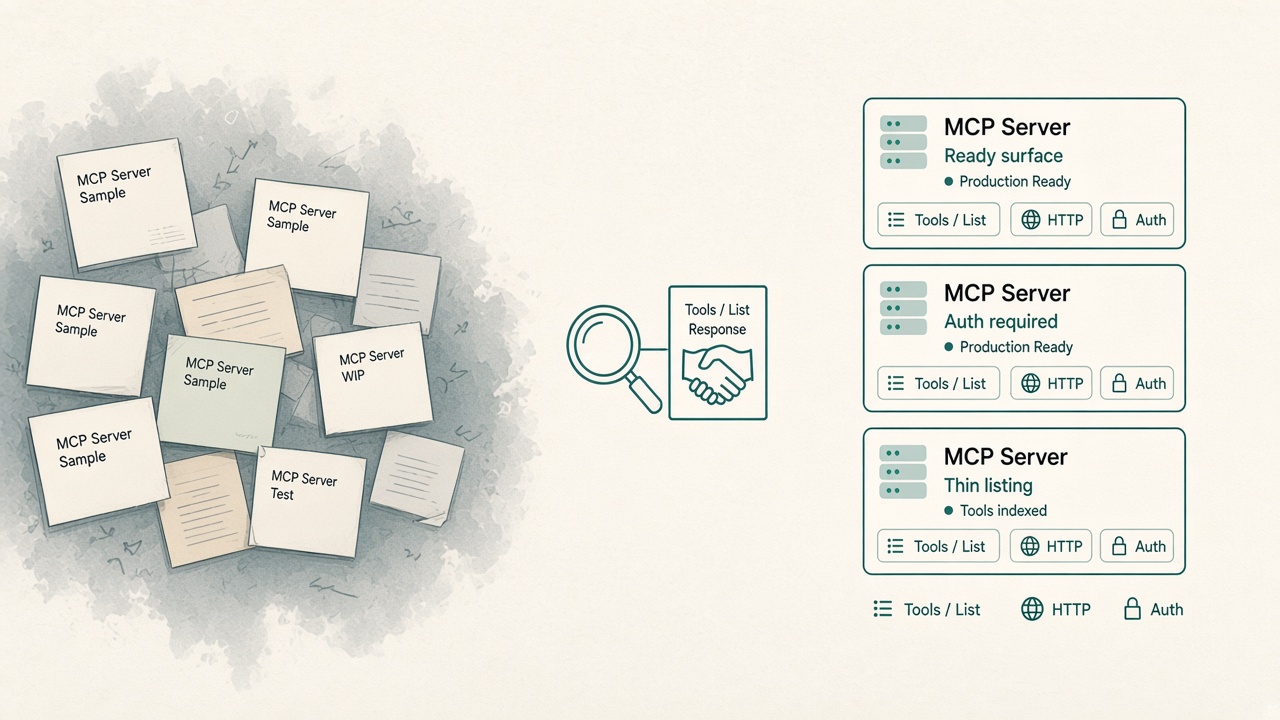
Open a random MCP listing. It has a name, a category, maybe a star count. Sometimes a docs link. Often zero tools. The Connect button still looks confident.
That confidence is the problem.
Influzer’s directory now holds about 11,500 MCP servers. Only about 400 have searchable, indexed tools. We already argued that most MCP servers are still demoware and that SkillSpector is for skills — not a SAFE chip on MCP. This week we shipped the missing product piece: a live quality layer that labels what we actually know about a listing — and refuses to pretend the rest is approved.
Not “safe.” Just honest.
The long-tail trust problem
Builders do not fail because they cannot find a server. They fail because the catalog looks finished when the tool surface is empty.
- Brand slug you expect (
/mcp/corpusiq) is not the registry slug that actually exists - A docs URL is not an MCP endpoint
- A 401 on
tools/listoften means OAuth is alive — not that the server is dead - Stars and “official” badges do not tell you whether anyone has handshake-probed the live surface
We already teach eyes before hands and paste-a-key is dead. Quality labels are the directory half of that story: search and shortlist with facts, then decide what belongs on the allowlist.
What we label (and what we refuse to label)
Every listing now carries observable signals joined from the catalog and our daily probe state:
| Signal | What it means | What it does not mean |
|---|---|---|
| Surface | Ready surface / Tools indexed / Thin listing / Unverified | Approved for production |
| Live handshake | Live OK / Auth required / Unreachable / Not probed / Local only | Your org’s IdP story is done |
| Auth gate | Whether the probe saw an auth challenge | Scopes are least-privilege |
| Tools source | tools/list (live) / registry fallback / catalog / none |
The tool names are still true next week |
There is intentionally no SAFE badge. Source-safety scans still flag poison patterns on submissions. SkillSpector still belongs on agent skills you can clone. Neither becomes a green chip that says “install this.”
How to use it in 60 seconds
- Open the Top 100 or full directory.
- Use the Quality row: Ready surface, Tools indexed, Live probed, Auth required, Thin listing, Unverified.
- Sort by Best listing quality when you want signal over star count.
- Open a detail page — Listing quality sits above the tools list: surface, handshake, auth gate, tools source.
- Only then put a candidate on your allowlist /
.cursor/mcp.json.
Example: a polished remote server with indexed tools and a live probe that returns 401 shows Ready surface + Auth required. That is useful. It is not permission to paste a personal PAT into shared config.
Example: a brand-name connector with 0 tools and Not probed shows Thin listing. Treat it as a lead, not a dependency.
Why Discovery gets better without growing the catalog
Our official Discovery MCP already searches by capability — search ≠ install. Ranking now nudges toward ready / live-probed surfaces and away from thin and unverified listings. Agents get the same honest fields in summaries: demoware tier, live status, auth gate, tools indexed.
You do not need another 10,000 stubs. You need the existing 11,500 to stop lying by omission.
The demoware filter, productized
The 30-second scorecard from the demoware Insight is now UI:
- Does a real tool surface exist?
- Did we handshake the live endpoint (or is it local-only / unprobed)?
- Did auth show up as a gate?
- Where did the tool list come from — live
tools/list, registry fallback, or catalog only?
Pair that with policy before plugins: Discovery finds candidates. Humans still own the allowlist row.
Quick answers
Is “Ready surface” the same as production-ready?
No. It means we see a known transport and a real tool surface (often with live or curated evidence). Your IdP, scopes, and kill switch are still your job.
Why do so many remotes show Auth required?
Because a live initialize / tools/list without credentials often returns 401/403. That is a heartbeat, not a failure — and not a free pass on credentials.
Will you ever add a SAFE badge?
Not as a catalog verdict. We will keep labeling facts and pointing builders at scanners for what they can actually inspect.
Where should I start today?
Filter Ready surface on the directory, connect Discovery, and keep write tools off the shared config until the eyes stack is daily use.
Related reading
- Most MCP servers are still demoware
- Scan skills with SkillSpector — don’t badge MCP “safe”
- Eyes before hands
- Paste-a-key is dead
- Discovery MCP is the new App Store search
Final thought
A pretty docs URL is not a tools/list. Stars are not a surface. And “looks official” was never the same thing as safe to install.
Not safe — just honest. Filter the long tail with facts. Handshake what you connect. Put only the survivors on the allowlist.
Start on the directory. Search from inside the agent with Discovery. And when a listing has zero tools and a shiny name, believe the Thin listing chip — not the Connect button.
One clear email each Thursday
Actionable frameworks on AI execution, agents, and MCP.
Leave a comment
Be the first to share your thoughts.