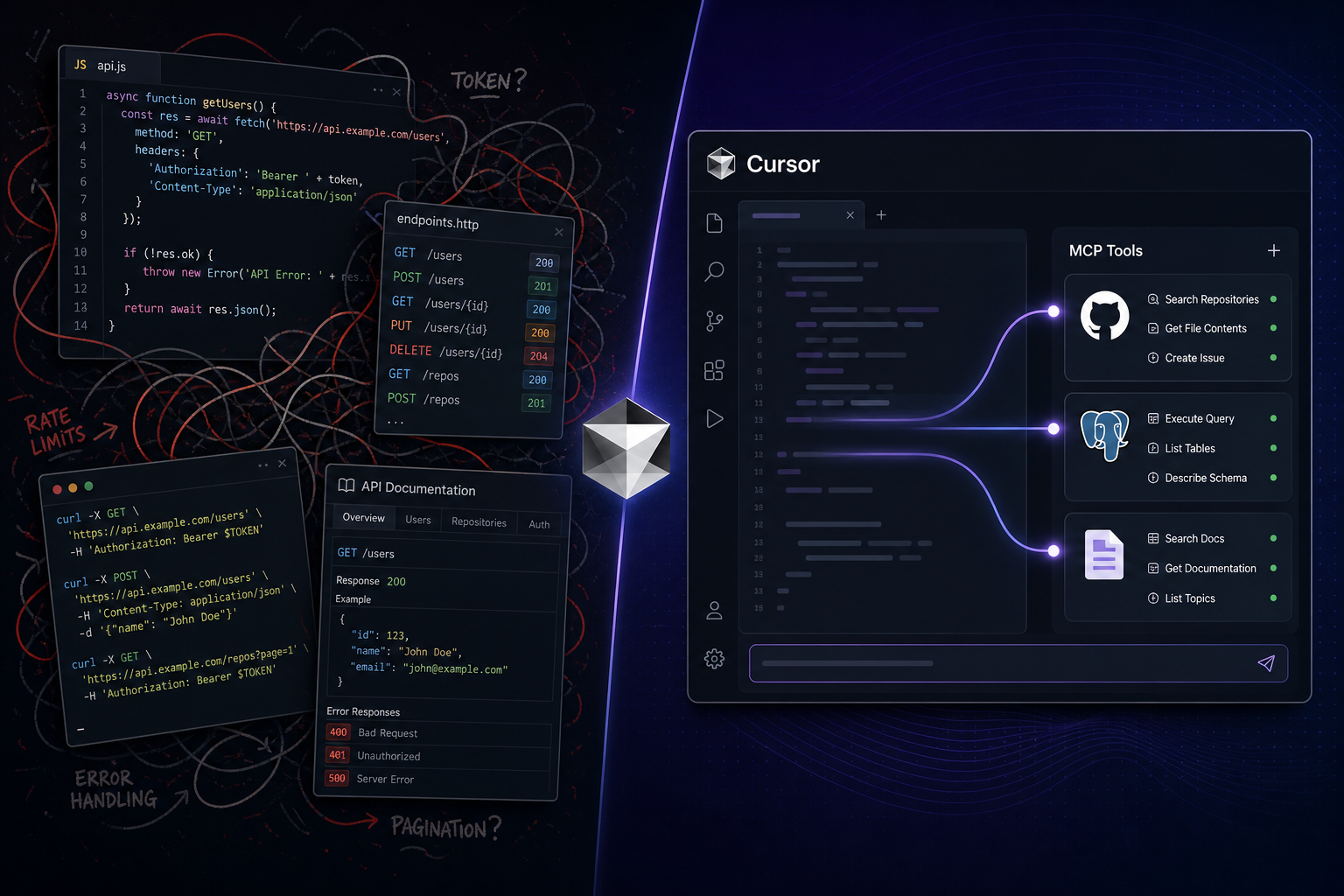
It was 4:47 p.m. on a Thursday. Staging was fine. Production was not.
A checkout flow started failing for a subset of users — the kind of bug that does not reproduce locally, does not show up in unit tests, and absolutely will land in the Friday standup if you do not crack it tonight.
I opened Cursor, like I always do. The agent already knew the repo. It could read our services, trace the handler, and suggest fixes. But the bug lived outside the repo: a migration that shipped in last Tuesday’s release, a support ticket describing the exact error string, and row-level data in production Postgres that I was not about to paste into a chat window.
I had done this dance before. I knew two ways to solve it.
One path looked like 2019. The other looked like 2026.
Path one: the REST afternoon (the one I used to live in)
The old workflow goes like this. You are in Cursor, but your agent is blind past the git boundary. So you become the integration layer.
Step 1 — GitHub archaeology. Open api.github.com in a tab. Find the right endpoint for “commits between tags.” Copy a cURL example. Paste it into a scratch file. Realize you need a fine-scoped token. Dig through 1Password. Fix the pagination. Paste the JSON output back into Cursor and ask the agent to summarize.
Step 2 — Database forensics. You cannot hand production credentials to an LLM in good conscience, so you write a one-off Node script: pg client, env vars from .env.staging, a query you hope is read-only. Run it in the terminal. Copy rows into the chat. The agent suggests a hypothesis. You tweak the query. Run again. Repeat until dinner.
Step 3 — Docs roulette. The payment SDK changed behavior in a minor version. You paste a link to the changelog. The model summarizes from memory. You paste the actual doc page. Better — but now you are doing the research, not the agent.
Three hours later I had an answer. I also had:
- A
debug-prod-ish.tsfile I would delete on Monday (or forget and commit by accident) - API tokens sitting in shell history
- A brittle prompt that only worked if I pasted the right JSON shape
- The sinking feeling that I would rebuild this exact glue the next time something broke in prod
Cursor made me faster inside the codebase. REST made me slower at the edges — because every external system was still a custom integration project, even when the “integration” was just me copying HTTP responses into a chat.
Path two: the same bug, MCP connected
Two weeks later — different bug, same shape. Data in Postgres. Context in GitHub. Behavior documented on the web. This time I had spent one afternoon wiring a small MCP stack in Cursor:
- GitHub MCP — compare releases, read issue comments, search the org
- Postgres MCP — read-only connection to a replica (not prod write access — I am not reckless)
- Context7 — live library docs for the SDK we were debugging
I did not open Postman. I did not write a scratch script. I asked Cursor something embarrassingly plain:
“Compare the last two production deploy tags on GitHub, check whether migration
20250618_add_checkout_flagsran on the read replica, and pull the current docs for the payment client’sconfirmPaymentmethod. Tell me what changed that could cause intermittent 402s.”
The agent called tools — not imaginary ones. Real tools/list entries I had verified the day before. GitHub returned the diff between tags. Postgres returned migration state and a sample of affected rows. Context7 pulled the SDK signature and changelog notes.
Twenty-two minutes later I had a credible root cause: a feature flag default flipped in the migration, combined with a stricter validation path in a patch release we had not re-tested against legacy rows.
Same model. Same repo. Different perimeter.
What actually changed (it is not magic)
MCP did not make the database smarter. It did not fix the bug while I grabbed coffee. What it removed was the tax I kept paying at the boundary between “agent that reads code” and “agent that can do things in the systems code depends on.”
| Task | REST + paste into Cursor | MCP tools in Cursor |
|---|---|---|
| Discover what is possible | You read docs; the agent waits | tools/list at runtime — the agent sees capabilities |
| Call external systems | You write scripts or cURL; copy output | Agent invokes named tools with schemas |
| Swap GitHub → Linear | Rewrite client code and prompts | Change MCP config; same agent loop |
| Onboard a teammate | “Here is my debug script folder” | Share .cursor/mcp.json + token setup doc |
| Failure mode | Wrong endpoint, wrong paste, stale summary | Wrong tool args, auth errors — still need validation |
REST is still doing the heavy lifting under many MCP servers. The GitHub MCP server speaks GitHub’s REST API. Postgres MCP speaks SQL. The win is not that HTTP disappeared — it is that I stopped being the human middleware between Cursor and those APIs every time something broke.
For a fuller protocol comparison, see MCP Servers vs REST APIs. This post is the lived version of that table.
Why Cursor is where the story lands
Other clients — Claude Desktop, custom agent backends — benefit from MCP too. But Cursor is where millions of developers already live: inline edits, repo context, terminal, agent panel. The integration story is not “spin up a separate copilot.” It is extend the IDE you already have.
That matters for three reasons:
1. Context compounds
When the agent can read your code and query the database that code writes to, hypotheses get cheaper. You are not alternating between “code window” and “evidence window.” The loop stays in one place.
2. Config is team infrastructure
A checked-in .cursor/mcp.json with approved servers — GitHub, Context7, read-only staging DB — is onboarding in a file. Compare that to “clone the repo and ask Sarah which debug scripts still work.”
3. The bar for “agent-ready” dropped
You do not need a platform team to expose internal tools. You need a server from the Top 100 MCP directory (or a thin wrapper you publish yourself) and an afternoon of setup. Our first MCP servers in Cursor guide walks through a starter stack if you have not wired any yet.
The honest limitations (read this before you wire prod write access)
I am not selling a fairy tale. The MCP afternoon was better. It was not free.
- Setup still takes work. Tokens, read-only roles, allowed filesystem paths — MCP makes the perimeter visible; you still own security.
- Agents pick wrong tools. Overlapping servers confuse model selection. Start with three to five tools, not thirty.
- Schemas are not guarantees. The agent can pass valid JSON that is semantically wrong. High-stakes queries still need human review — see why AI output validation requires human engineers.
- REST wins on hot paths. Your checkout service should not call Postgres through an LLM tool at request time. MCP is for developer workflows and agent orchestration, not replacing your core API layer.
The mistake is not “use MCP everywhere.” It is “keep hand-wiring REST into Cursor prompts when a server already exists.”
A practical split: what I keep in each lane
After a month of coding with both patterns, this is the line I draw:
Still REST (or gRPC) in application code:
- Service-to-service calls with SLAs
- Public product APIs for customers and partners
- Deterministic transactions — payments, inventory, anything that must be idempotent and audited
MCP at the Cursor boundary:
- Debugging across repo + tracker + database
- Research — docs, web, issue threads
- Boilerplate that used to be “write a script, run once, forget”
- Prototyping agent features before you harden them into production orchestration
That is the pattern more teams are converging on: REST inside, MCP outside. Your microservices keep their contracts. Your IDE agent gets a plugboard.
How to replay this story on your machine
You do not need my exact bug. You need the same shape — external evidence the repo alone cannot provide.
- Pick one recurring pain — “I always open GitHub in a browser,” “I always write SQL scripts,” “I always paste doc links.”
- Find the MCP server in the Top 100 or search the full catalog by capability.
- Add one server to Cursor, verify
tools/list, run a read-only task. - Add the next server only when the first is boring — reliability beats breadth.
- Time the next incident — compare to your last REST-and-paste afternoon.
If the server you need is missing, submit it. The directory syncs weekly; tool lists are re-validated daily.
Quick answers
Is this just “use the GitHub API with extra steps”?
Under the hood, often yes. The extra steps are standardized discovery, shared config, and an agent that can call tools without you writing a new wrapper per incident.
I already tried Cursor and gave up. Why would MCP change that?
Many developers hit a ceiling when the agent could read code but not act in the systems around it. Tools raise that ceiling.
Can I use the same servers in Claude Desktop?
Mostly — same servers, different config file location. Capability is portable; client setup varies slightly.
Where does enterprise auth fit?
Managed MCP and OAuth at the org boundary are maturing fast. For the strategic view, see enterprise-managed MCP auth changes the game.
Final thought
Cursor did not get less useful. The missing piece was never “a smarter model.” It was reach — the ability to touch GitHub, the database, and live docs without me playing integration engineer every afternoon.
REST built the web. MCP is building the agent edge. The developers shipping fastest in Cursor are not the ones with the longest prompts. They are the ones who stopped writing glue code and started connecting servers.
Wire up GitHub and one database or docs server this week. Save the next Thursday afternoon for something only you can build.
One clear email each Thursday
Actionable frameworks on AI execution, agents, and MCP. Join 4,200+ builders.
Leave a comment
Be the first to share your thoughts.